A workout tracker for Wear OS that also knows what you ate
Flawless puts your workout on a Wear OS watch such as a Galaxy Watch or Pixel Watch: every set with weight and reps, a rest timer with reps in reserve, and live heart rate. Today’s calories and water are on the watch too, because the same app logs your food.
Free, for Wear OS 3 and later, with the Flawless app on your Android phone.
What you can do on the watch
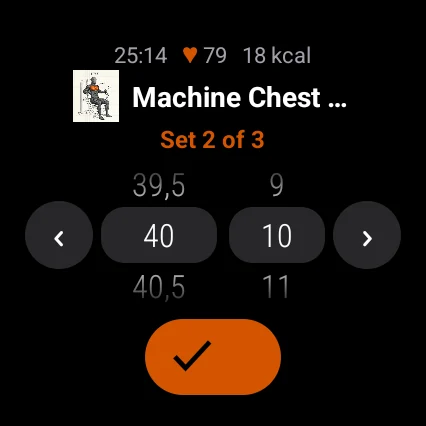
- Log every set. The watch shows the current exercise and set. Turn one wheel for the weight, in 0.5 kg steps, and one for the reps, or set the time for a timed exercise, then tick the set. A set can be switched between normal and warm-up.
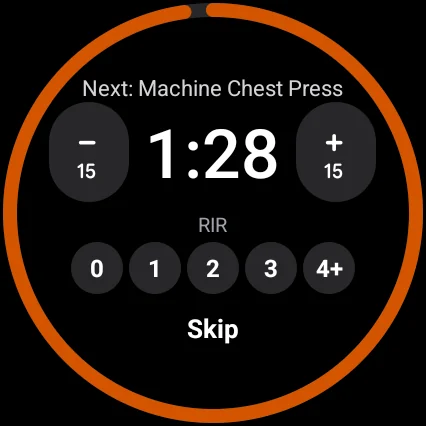
- Rest timer with reps in reserve. The countdown starts after each set. Change it by 15 seconds or skip it, and tap how many reps you had left: 0, 1, 2, 3 or 4+.
- Heart rate. Live heart rate and calories from the watch during the workout, measured even with the screen off. Afterwards the heart-rate samples are saved with the workout on your phone.
- Run the workout from your wrist. Start a workout from the watch, run a countdown for a timed hold, swap or remove an exercise, and finish the workout.
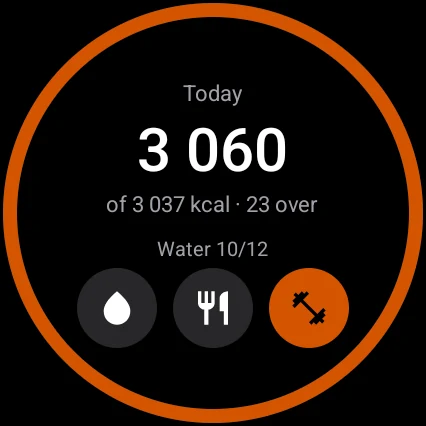
- Your day. Calories eaten against your goal and your water, one tap per glass. Today’s meals are there too, and you can tick off a planned meal as eaten.
- On the watch face. While a workout runs, it shows as an ongoing activity on the watch face.
- In your language. The watch uses the same 16 languages as the phone app.
How to start
- Install Flawless on your Android phone from Google Play and sign in.
- The Wear OS app installs with the Flawless Android app, on Wear OS 3 and later. If it is not on your watch yet, open Google Play on the watch and install Flawless.
- Open Flawless on the phone once, so the watch gets your day and your workout.
- Start the workout on the phone, or tap the dumbbell on the watch and confirm. The phone sets it up and the watch follows.
Keep your phone nearby
The phone holds your workout and saves it. Every set you tick on the watch goes to the phone straight away, so the phone needs to be in range. If it is not, nothing is saved: the watch does not keep a queue to send later. If you start a workout from the watch and the phone does not answer within 12 seconds, the watch asks you to open Flawless on your phone.
If you want to leave the phone in the locker, Hevy does that better: its Wear OS app saves the workout on the watch and syncs it when the watch reconnects to your phone (Hevy on Google Play).
Food and training in the same app
Flawless also logs food on the phone, by barcode, search, photo or voice, so the calories on your wrist are the ones you actually logged. Logging food happens on the phone; the watch shows your day, adds water and ticks off planned meals.
The watch app is free, like the rest of the log, with no PRO lock. On the phone, the average and maximum heart rate of a workout are free; heart-rate zones are part of PRO.
Wear OS workout apps, compared
| Feature | Flawless | Hevy | MacroFactor | Google Health |
|---|---|---|---|---|
| Log sets on the watch | Yes, free | Yes, free | Not yet; it hopes to within a year, without a promise | On Pixel Watch 5, announced as coming soon (August 2026) |
| Without the phone nearby | Nothing is saved | Saves on the watch, syncs when it reconnects | – | – |
| Food log in the same app | Yes, free | No | A separate app, MacroFactor Nutrition | Base: log nutrition; Premium page: macros from a photo or chat |
| Watches | Wear OS 3 and later, and Apple Watch | Wear OS and Apple Watch | Apple Watch, for MacroFactor Nutrition | Fitbit and Pixel Watch |
Checked on 11 October 2026 on each company’s own pages: Hevy on Google Play, Hevy features guide, MacroFactor Monthly, September 2026, MacroFactor help, MacroFactor on Apple Watch, Google Store, Google Health help and Pixel Watch 5 announcement. Hevy’s food log: none on its own pages (checked 6 October 2026). All trademarks belong to their owners.
If you have one of this year’s watches, such as the Galaxy Watch9, which Samsung unveiled in London on 22 July 2026 (Samsung Newsroom), or the Pixel Watch 5, on sale since 20 August 2026 (Google blog), Flawless works on it the same way: all it needs is Wear OS 3 or later.
When another app is the better choice
- You train with the watch alone. Hevy saves workouts on the watch and syncs them later; Flawless needs the phone in range.
- You wear a Pixel Watch or a Fitbit and want sleep and recovery coaching. Google Health Premium builds on what the watch measures; here is how it compares with Flawless.
- You only want a workout log on the watch and count food elsewhere. Hevy’s Wear OS app is free too.
More guides
Questions
Is there a free workout tracker for Wear OS that also counts calories?
Yes. Flawless logs sets, reps, weight and rest on a Wear OS watch and tracks food, calories and macros in the Android app. Both are free.
Does Flawless work on Galaxy Watch and Pixel Watch?
Yes, on Wear OS 3 and later, which includes the Pixel Watch and Galaxy Watch4 and newer. The watch app installs with the Flawless Android app.
Does the Wear OS app work without the phone?
No. The phone holds the workout, and every set you log on the watch goes to it straight away, so keep the phone in range. Without it nothing is saved.
Can I see my heart rate during a workout?
Yes. The watch measures heart rate during the workout, also with the screen off, and the samples are saved with the workout on your phone. Average and maximum are free; heart-rate zones are in PRO.
Is there an Apple Watch version?
Yes, free, for watchOS 10 and later. It logs sets, rest and reps in reserve and shows heart rate and your day; switching a set to warm-up and swapping or removing an exercise are on Wear OS only. See Flawless on Apple Watch.
Try it free
Free on Google Play and the App Store. The whole log is free; PRO is optional.