Macros, water and your streak on the home screen
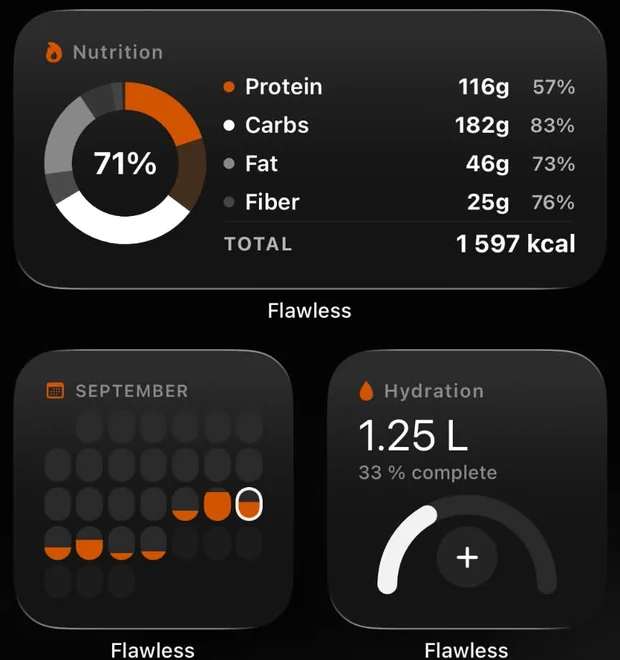
Flawless has three home screen widgets: your macros for the day, water with a plus button and a calendar that fills up as you hit your goals.
Free on iPhone and Android.
The three widgets
- Macros — calories and protein, carbs, fat and fibre against today’s targets.
- Water — tap − or + to log a glass straight from the home screen.
- Streak — your month at a glance. Each day fills up the closer you got to your goal, so a gap says more than a number.
Each comes in a small and a medium size, on iPhone and Android. Tapping anywhere else opens Flawless.
Adding a widget
iPhone
- Press and hold an empty spot on the home screen until the apps jiggle.
- Tap Edit → Add Widget and search for Flawless.
- Pick Streak, Macros or Water, choose the size and tap Add Widget.
The water buttons work right on the home screen from iOS 17.
Android
- Press and hold an empty spot on the home screen and tap Widgets.
- Find Flawless and drag Streak, Macros or Water where you want it.
Glasses you add from the water widget are saved to your day the next time you open Flawless.
More guides
Questions
Is there a widget that shows my macros on the home screen?
Yes. The Flawless Macros widget shows calories, protein, carbs, fat and fibre against today’s targets, on iPhone and Android. It is free.
Can I log water from a widget?
Yes. The Water widget has − and + buttons. On iPhone they work right on the home screen from iOS 17.
Are the widgets free?
Yes, all three widgets are part of the free app.
Try it free
Free on Google Play and the App Store. The whole log is free; PRO is optional.