Which muscles are ready to train today?
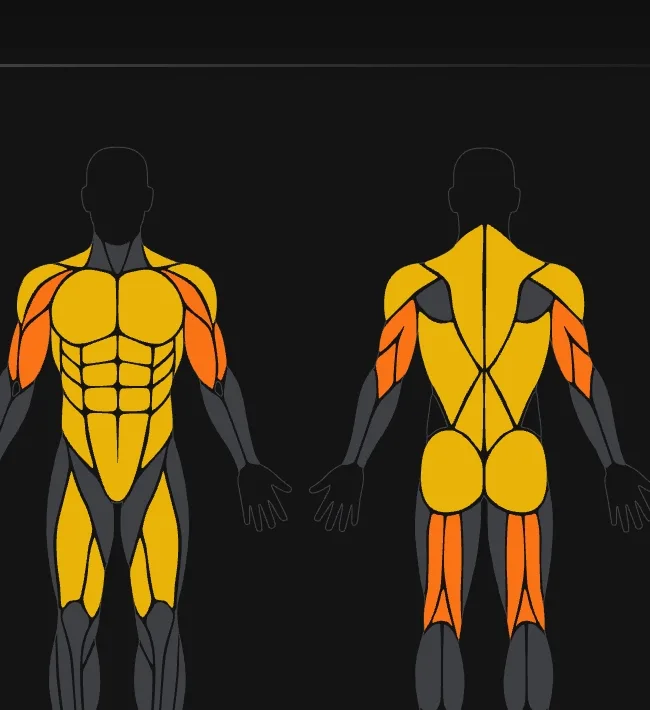
Flawless shows it on a muscle map: every muscle group coloured by how loaded it is from your recent workouts. Train what is ready, rest what is not.
Free, and it works from the workouts you log. No watch needed.
What the map shows
The muscle map on the Fitness tab shows how loaded each muscle group is after your recent training. Every exercise in Flawless knows which muscles it works and how much, so a heavy leg day shows on your quads and glutes, not on a generic “legs”.
Tap a muscle to see exercises for it. When everything has recovered, the map says so.
How to use it
- Pick today’s session. Train what is ready, rest what is still loaded.
- Spot what you skip. A muscle that never lights up is one you are not training.
- It feeds your day. Recovery is 10 % of the daily score next to protein, calories and water.
Free, and part of the whole log
The recovery map is free. It works from the workouts you log, with 469 exercises to choose from. PRO adds an AI recovery status and weekly volume per muscle on the Daily status tab.
More guides
Questions
Which app shows which muscles are recovered?
Flawless has a free muscle recovery map on the Fitness tab. It shows how loaded each muscle group is after your recent workouts, based on the muscles each exercise works.
Is the recovery map free?
Yes. The map is free. PRO adds an AI recovery status and weekly volume per muscle.
Does it need a smartwatch?
No. It is calculated from the workouts you log, so your phone is enough.
Try it free
Free on Google Play and the App Store. The whole log is free; PRO is optional.